Category: Development

  • Plains laid for WordPress 3.2

    WordPress have given some initial details of the plans for WordPress 3.2.

    Rather than adding lots of new features, this release is going to concentrate on speed improvements and restricting the WordPress minimum requirements (this will allow existing code to be removed and will make adding code in future easier).

    The requirements changing are…

    • PHP 5.2.4 required – WordPress will simply be dropping support for PHP 4 (i.e. there won’t be very many new PHP 5 features added)
    • MySQL 5 Required – like above, WordPress will simply be dropping support for MySQL 4
    • Internet Explorer 6 – no more fancy IE6-only hacks. WordPress will be officially discontinuing support for IE6 and instead providing a “use a real browser” nag screen (something this site already has installed)

    With support for long-outdated technologies being dropped, they promise this will be the fastest and lightest WordPress in quite some time. To this end they will also be focussing on speed improvements all around, including (but certainly not limited to) the Dashboard and admin menu.

    Two further announced changes are…

    • New Fullscreen Editor –  a new fullscreen editor that’s “more beautiful, more useful, and simpler.”
    • Better Upgrades – only changed files will be upgraded in future. Yay!

    WordPress have also promised faster release cycles in future (concentrating on what’s promised and not adding further changes later on).

    Certainly, I’m excited by this 😀

  • Do WordPress users need Jetpack?

    Automattic, the people behind WordPress have announced JetPack. In essence, it’s a plugin for self-hosted WordPress owners that adds functionality that WordPress.com bloggers have had for a while.

    That sounds a good thing, right?

    Well, most of the plugins (bar one) are available separately from Automattic and, this way, you can at least only install the components you actually need (reducing bulk and load on your installation).

    Here’s a run down of what Jetpack adds and where else, if possible, you can get the same functionality from…

    • WordPress.com stats – site stats delivered from WordPress.com. This is no longer available as a separate plugin.
    • Twitter Widget – the plugin library is chock full of Twitter widgets and general plugins. However, Automattic have their own Twitter widget named Wickett Twitter Widget which, looking at the code, looks pretty much to be the same plugin!
    • Gravatar Hovercards -various blogs have posted about how to add these to your WordPress blog yourself (as I have done). Alternatively, download a plugin from the directory.
    • WP.me shortlinks – a way of adding the WP.me URL shortener to your blog. As far as I can tell, this is not available as a separate plugin.
    • Sharedaddy – a social sharing tool. There are various alternatives, or you can download Sharedaddy from the plugin directory.
    • LaTeX – let’s you mark up your posts with the LaTeX markup language which is perfect, for example, for complex mathematical equations. Download from the plugin directory.
    • After the Deadline – adds advanced spell check and grammar checking facilities. Download from the plugin directory.
    • Shortcode Embed – puts LOADs of useful shortcodes to your fingertips, including video embedding. However, I suspect there are few of these that can’t be found elsewhere in other plugins. Instead of bulking up your site with shortcodes that may not be used, why not just install plugins to add those that you need?

    From what I can tell, the only feature that you can’t get elsewhere is “WP.me shortcuts” (a feature I’d like!).

    So, the answer is to install those that you want separately? It would be, but there’s a dark cloud in the Jetpack FAQ

    As we upgrade each of our individual plugins to be a part of Jetpack, we’ll prompt you to switch over to the new, Jetpack-powered version.

    Oh. You’re going to be forced to install all of them as Jetpack.

    I don’t get it. What’s the point of Jetpack? Ok, so they’ve bundled a number of (their) plugins together – but isn’t the joy of WordPress plugins that you can mix and match as you choose from different authors, getting each just the way you need it?

    This post has been updated from the original, as I thought that individual components of Jetpack couldn’t be deactivated, which would have lead to more serious concerns. After further testing, however, I’ve found that this is not the case.

  • WordPress function get_the_shortlink

    Many WordPress functions have a standard version which outputs the results directly and an additional version prefixed with get_ that returns the output – useful for adding to a string and manipulating before output.

    One such exclusion is the_shortlink, which returns a short link to any page or post – there is no get_the_shortlink, so many people have to resort to just outputting the result in a FORM field for people to cut & paste.  However, here is a quick way to add the capability to your blog.

    (more…)
  • Integrating MantisBT with WordPress

    Integrating MantisBT with WordPress

    Recently I mentioned how I was integrating MantisBT with my blog. Well, I thought I’d release the code for anybody else to use and tinker with.

    (more…)

  • WordPress Plugin Bug Tracking

    For a while I’ve been wanting to improve the bug (and enhancements) tracking for my WordPress plugins. Right now I rely noting down my ideas and any suggestions that people have made and looking at that whenever I’m working on a plugin.

    Now, though, I’ve installed MantisBT – a free PHP based bug tracking system. I’ve installed it on domain, configured it up and I’m in the process of adding content – my Simple Social Bookmarks is the guinea pig.

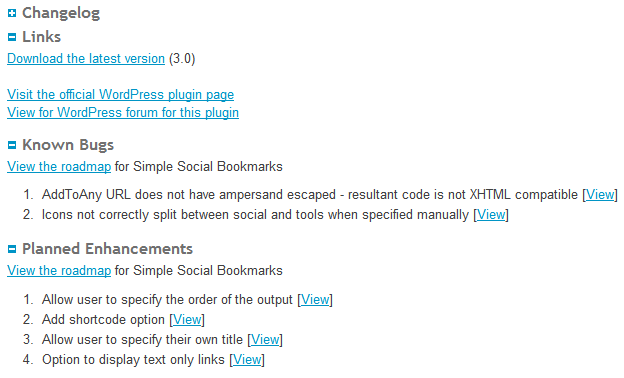
    Anyone can view it, but I wanted tighter integration with this site. Plugins exist to do this but they rely on using a SOAP interface – my host doesn’t have this installed, so I can’t use it. Instead I’ve written my own code that directly accesses the MySQL database – and very well it works too. On the bottom of the plugin pages on this site are two new sections – Known Bugs and Planned Enhancements. Under each are listed any entries from the MantisBT database relevant to that category, as well as a link to the roadmap.

    Before you go looking for this, it isn’t yet visible, as it’s part of the site revamp that I’m working on.

    Right now, I don’t intend to release this as a plugin, but if there’s enough interest I may do.