Recently I mentioned how I was integrating MantisBT with my blog. Well, I thought I’d release the code for anybody else to use and tinker with.
Category: WordPress
Plugin developer, Core contributor and support volunteer. Yeah, I’m a WordPress fan!
-
WordPress Plugin Bug Tracking
For a while I’ve been wanting to improve the bug (and enhancements) tracking for my WordPress plugins. Right now I rely noting down my ideas and any suggestions that people have made and looking at that whenever I’m working on a plugin.Now, though, I’ve installed MantisBT – a free PHP based bug tracking system. I’ve installed it on domain, configured it up and I’m in the process of adding content – my Simple Social Bookmarks is the guinea pig.
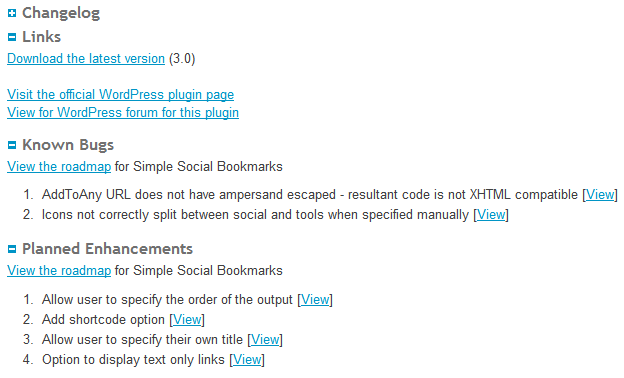
Anyone can view it, but I wanted tighter integration with this site. Plugins exist to do this but they rely on using a SOAP interface – my host doesn’t have this installed, so I can’t use it. Instead I’ve written my own code that directly accesses the MySQL database – and very well it works too. On the bottom of the plugin pages on this site are two new sections – Known Bugs and Planned Enhancements. Under each are listed any entries from the MantisBT database relevant to that category, as well as a link to the roadmap.
Before you go looking for this, it isn’t yet visible, as it’s part of the site revamp that I’m working on.
Right now, I don’t intend to release this as a plugin, but if there’s enough interest I may do.
-
Finding the length of WordPress Posts
I’m just finished converting my plugin pages to use my new WP README Parser plugin. However, I had a nagging feeling that I might have missed, at the very least, 1. But how can I easily tell without going through them all one-by-one?
Well, their length is a give-away as instead of pages of text, there’s now a single call to my plugin. A quick bit of SQL will show the length of each post and/or page in characters, allowing me to see if any of the original versions still exist.
Here is an example using standard table naming and will list the details of pages…
SELECT ID, post_title, guid, length(post_content) AS 'Post Length' FROM `wp_posts` WHERE post_type = 'page' AND post_status <> 'draft' AND post_status <> 'trash' ORDER BY length(post_content)
That 3rd line can be modified to
WHERE post_type = 'post'for posts, or combined with the original to list both posts and pages.Otherwise, it simply lists the ID, title and URL for each page as well as the character length of the page content. It excludes drafts and anything in the trash. The final list is sequenced by the length of the page.
Not sure if this is useful to anyone, but just in case….!
-
WordPress README files and Markdown
For those who’ve not come across Markdown, it’s a way of using simple keyboard characters in a text file to indicate formatting. For example **this would be bold**.
WordPress uses Markdown for the README files that accompanies each plugin – this same file is used to display the plugin details on the WordPress site. Therefore, as a plugin author, I am required to produce Markdown format files.
At the moment, because I want to have my plugin details on my site as well, I copy and paste the README file to a WordPress post and re-format it. Now, you can change WordPress to use Markdown, but it requires switching off the standard editor as otherwise it will modify the results.
One of the authors of Markdown, John Gruber, provides conversion scripts in Perl, as well as instructions for modifying WordPress. What I would ideally like, though, is a way to display README files on my site, as required. There is a plugin that will already do this but it does the conversion itself and, well, not very well. The results are iffy to say the least.
To make matters worse, WordPress’ implementation of Markdown does not match the standard design.
As with many of my plugins, the need to be able to do something myself has lead me to write a solution. Michel Fortin has converted John Grubers script to work under PHP and, using this as a basis, I am creating a plugin that will display WordPress format README files in a post.
I’m still working on it, but the principle is that I read in the file and, first, convert the WordPress format to standard Markdown format. From there I can use Michel’s script to do the final conversion. So far, it’s looking good and I’m spending time now adding extra features, such as the ability to miss out README sections (for instance, the installation instuctions) – otherwise, the README is displayed as it is in the actual file. It finds WordPress username and tags and adds automatic links and I’m going to add compatibility with my Simple Content Reveal plugin, so that each section can be collapsed and revealed.
I’ve already had to speak to Michel about it after having some initial issues, and he’s been very good and helped me out.
Look out for it in the coming weeks!
-
WordPress & Spam Pingbacks
My posts often receive pingbacks – these are other blogs that have referenced my post. However, I still insist on manually authorising these, like comments, because they too can be prone to spam.
These spam sites are often WordPress sites which are set up with plugins installed that are designed to trawl and integrate content from other sites. They then plaster adverts all over their site and then leave the site to make revenue. They become popular because of this back-linking to the other sites.
And, visiting them it is often obvious that they are a spammer due to a total lack of its own content and, my personal favourite, visting the “About” page and finding this…
This is an example of a WordPress page, you could edit this to put information about yourself or your site so readers know where you are coming from. You can create as many pages like this one or sub-pages as you like and manage all of your content inside of WordPress.
Yep, that’s the default content of this page after a fresh installation of WordPress – they can’t even be bothered to fill this in.
So, here’s an example. My review of the Logitech C510 webcam got a Pingback from a website named “Review Central”. Yep, no original content, no effort in the site design, adverts everywhere, a default “Meta” list in the sidebar, and the aforementioned “About” page. It’s spam, and marked as such.
Update: Ahh, the irony. The same day I published this post, I received a pingback on it from a spam site picking up on me mentioning the Logitech webcam. So they’re now proudly displaying my post on their spammy site which complains about shoddy spam sites who just publish other people’s posts. Nice.