Category: Life

Random thoughts on life

  • I hate to say it, but I'm disappointed with the Galaxy Nexus

    Since the Galaxy S2 launched earlier this year no other phone has come near to its capabilities – and that includes, I think, the iPhone 4S. As far as I’m concerned the S2 still reigns supreme.

    So, I’ve been excited by the launch of the Galaxy Nexus – the newest release from Samsung, sporting Android 4 as its main highlight.

    Other than Android 4, it’s other big thing is the screen – 4.3″ inches at 720×1280. Although the screen physically is bigger the whole device is apparently on a par with the S2 as the screen is taller rather than wider and this extra width takes the place of the buttons at the bottom.

    However, ignoring the OS and screen resolution for a moment, when you start comparing the rest of the phone specifications it suddenly starts to look a little more disappointing…

    • The Nexus has a Super Amoled screen. The S2 has a Super Amoled Plus screen. There is a difference, and it’s important.
    • They both sport a 1.2Ghz Dual Core processor.
    • The S2 weighs 116 g, whereas the Nexus is 135 g.
    • There is no removable storage option on the Nexus, compared to the Micro SD on the S2.
    • The Nexus lacks USB On-the-Go and Wi-Fi Direct.
    • The rear camera on the Nexus is 5MP and the front 1.3MP. On the S2 you get an 8MP rear and 2MP front camera. However, the Nexus does give you a twin LED flash rather than the single on the S2.
    • The headphone socket is on the bottom. Really? Because when I have a set of headphones plugged in and my phone in my pocket, I really want to have it upside down. No news yet as to where they’ve sited the USB socket.
    • It’s a personal preference but the Nexus has more rounded corners, looking like one of its cheaper cousins, and I don’t like it.

    One thing I’m not sure about, comparison wise, are the GPUs in the 2 phones which are very different. However, forum discussions would suggest that the S2 might edge it.

    One thing that I can find on the Nexus which is better than the S2 is the battery, which is 1750 mAh, compared to 1650 mAh. Extras, the Nexus has a built in barometer. Really.

    So, a higher resolution screen, a bigger capacity battery and ability to know if it’s about to rain in the next few hours. But you get a poorer set of cameras, more weight and a load of features missing. Or have I missed something?
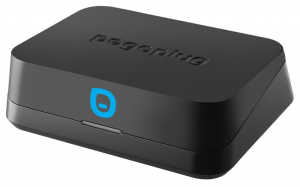
  • Pogoplug Mobile

    Pogoplug have now released a new device, Pogoplug Mobile. Looking like a tiny Pogoplug Pro, this is designed for sharing files with a mobile device – phone or tablet.

    It connects to your router and has both a USB port and card reader built in. Plug in a card, USB stick or hard drive and you can access and stream information to and from your device.

    Costing £59.99 this is a cheaper alternative to the Pogoplug Pro, but obviously has a more limited set of features. What’s not obvious at the moment, however, is what is and isn’t possible. Can you access the files on computers using the Pogoplug desktop client, for instance? Can you view your files online using the My Pogoplug site?

    Even without any of those features at the very least this will allow you to remotely access your files on your mobile device and, to me, seems an excellent buy.

  • Can you really get free solar panels for your home?

    Having recently moved home and being the environmentally conscience chap I am, I looked into solar panels.

    What I think a lot of people don’t realise is the fact that you can now get them very cheaply or even free.

    For instance, E.ON will install them for £99 (if you’re a customer – £199 if you’re not).

    How is this possible? The government introduced a scheme last year named Feed In Tariffs (FITs) which provides the following…

    • A payment for every unit of electricity generated by your system. This is paid regardless of whether your home is using the electricity or not, and this year the payment is 43.3 pence per unit
    • An additional payment for any electricity that isn’t used (e.g. when you’re on holiday). This is exported to the national grid, and the payment this year is 3p per unit

    The payments are guaranteed by law for 25 years and will rise with inflation.

    The nub of this is that it pays to install solar panels – hence many companies can fit them for free and take the money from FITs. Of course you still get free electricity from it and can typical save at least a third of your bills.

    Of course, you can pay the full amount and take the FIT amount yourself.

    I looked at a company named HomeSun who will fit and maintain them for free. There are a number of conditions – such as your house facing the right way, living south of Hull (sorry Hull) and being able to provide enough roof space – and, sadly, my home wasn’t suitable. In this case they have a 2nd option where you pay up to £500 towards the installation (when it’s free they need to make sure they can make the money back).

    If you’re interested in the service from HomeSun – and there certainly seems to be lots of positive feedback (in their interest – they only make their money back if it’s a decent installation!) – then visit their website. If you use the referall code of HOMESUN_11604B522 then you’ll also earn yourself £50 in M&S vouchers.

  • EaseUS Competition Winners

    I happy to announce the following winners of the EaseUS competition, each of whom win a licence to an EaseUS software product…

    • Irene Hunter
    • Tracy Hanson
    • Graham Snow
    • Steve Western
    • Diane Duggan
    • Gwyneth Sharps
    • Darren Newman
    • Alex Nash
    • Darren Edgell
    • Emma Speers

    Congratulations to them all!

  • Run Android Apps under Windows 7

    At only an alpha release BlueStacks is a way to run Android Apps on Windows 7.

    Simply download their software and, once installed, an Android logo will appear on your desktop as a gadget. Click on this to show a number of pre-installed gadgets. More, but not a huge selection, are also available on the BlueStacks website. The best way of getting additional apps is to install their matching Marketplace App onto your phone or tablet – from that you can transfer your existing apps to your desktop.

    I didn’t try anything too taxing – a Pro version is to made available soon with more functionality – but those I did try worked really well. They all appear full screen (to an extent – depends on the size and orientation of the App) – I’d like to be able to run these in a more realistic sized window on the desktop. Maybe this is a future option.

    For the time being, BlueStacks looks promising and I look forward to seeing how it develops. If you’re an Android App developer I can certainly see a great advantage in having this available.