I met a Skype representative recently and was asked the question, “do you use Skype”. My answer was “no, but I don’t know why”. And I suspect my answer echoes a lot of other people. Skype offers free video calling world-wide. Even if it’s just to your mum in the next town, it’s still a useful service.
You can also have a landline number allocated to your phone so other people not on Skype can contact you. And if you need to call them, Skype rates are extremely good. Of course most people probably have free calls with their phone package. Using Skype instead of a landline would sound good, but most people are ties to a BT landline because of their broadband. You could, of course, go for cable broadband but the matching phone services with them are so competitive you’re more than likely going to end up on those. All of this changes, however, if you call abroad as Skype then becomes competitive again.
Skype is available on PC, Mac and Linux and pretty much every phone OS worth knowing – Android, iOS, Windows Phone, Symbian. The Windows Phone version is new (probably related to the fact that Skype was recently bought by Microsoft), as is a version for the PlayStation Vita games console. You certainly can’t accuse of Skype of not being available!
So, it offers free video calls to other Skype users and cheap calls to landlines and mobiles around the world, on pretty much any platform you can think of. It offers excellent video and sound quality. Yet, I very rarely use it.
The main reason is that I have few Skype contacts. Skype doesn’t make it easy to find people. A recent “teaming up” with Facebook, however, has integrated Skype into Facebook’s chat service and also given Skype access to your Facebook contacts. This is a start, but I’d really like to see more ways to find people you may know.
But aside from that… why don’t I use Skype? And the fact that I can’t think of an overwhelming reason would suggest that it really is time that I gave it another try.
On Saturday I attended BlogCampUK, a free workshop for bloggers. Organised by Tots100 it was, understandably, full of “mummy bloggers”. Indeed, of the 120 bloggers there, I suspect about 4 were men (when assembled in a single room it was like playing “Where’s Wally” when looking for the male contingent). All of this meant that there was a lot of cake. However, none of that (why would it?) detracted from what a great day it was.
There were a number of workshops throughout the day – often 3 at the same time, so you’d have to carefully pick which you wished to attend. I can only really speak for those I attended, so here’s a quick breakdown of what I attended, what I thought of each and the odd assortment of embedded presentations and some photos from the day…
Session 1 – Get Inspired
Okay, for the first session there was only one choice and it was how to get inspired, a brilliant talk with Muireann from Bangs and a Bun. There were some excellent suggestions on how to create a better blog and the talk, although 45 minutes long, never dragged. Certainly a good start to the day.
Session 2 – How to Be a Snark
Possibly the reason I went in the 1st place and it really hadn’t mattered what other workshops were being run at the same time – this was the one I was always going to attend. This was presented by Stuart Heritage, a writer from the Guardian. I’ve followed him for some time on Twitter and are a big fan. Indeed, I only knew about BlogCampUK after Stuart mentioned it on Twitter last year.
And, I have to say, he got a rough ride. “Mummy bloggers” they may be, but they took no prisoners, and it was all the more funny for it. My favourite was the person who wasn’t sure what a “snark” was and, after it was explained to her, stated “well, why would you want to be like that? It’s not nice.”
This workshop, if you can’t guess, it how to sarcy and snide but not be nasty. As another attendee has said, it wasn’t the most beneficial workshop as far as content was concerned, but it certainly amusing and gave some pause for thought.
One of the other session 2 workshops was hosted by Phil Szomszor, advising bloggers on self-hosting. I spoke with him beforehand, suggesting that if anybody has any WordPress technical questions that they direct them to me. He was more than happy to and, indeed, I was questioned later by one of the attendees.
After this session we had lunch, during which I chatted to Stuart, who appreciated some male company!
Session 3 – Making the most of your camera
An excellent workshop by John Arnold on how to take better photos. Although I have a DSLR, I always use it on the “auto” setting. I want to do more but find manuals a little dry – John cut through this to better explain what a lot of the technical terms actually mean (not in words, but in a practical sense) so I can now more confidentially switch off that auto selection and try things a little more advanced.
An alternative workshop was taking place during this on “Beginning SEO” with Lee Smallwood, an online marketing consultant.
This was a workshop about recent Google changes and use of the “nofollow” flag, presented by Ruth Arnold from geekmummy and Lee Smallwood. I didn’t know much about it and wasn’t expecting a huge amount but this was the one that had me thinking the most.
In a nutshell, Google are clamping down on sites (including blog sites) that contain sponsored links that don’t use the “nofollow” tag. This tag tells the search engines that the link isn’t worth pursuing and it doesn’t affect your PageRank as a result. If Google catch you they will often strip you of your essential PageRank.
If you’re a WordPress user, then adding a “nofollow” is relatively easy. When editing a post, click on the “HTML” tab and find the link in question. It will probably be something like this…
<a href="example.com">click here</a>
Simple add `rel=”nofollow` after the link, as follows…
Now Google (and others) will be instructed not to follow the link. Alternatively, there are many plugins available from WordPress.org that will make the above easier or even “blanket” your external links with “nofollow” by default. Personally, I’m avoiding the latter as the majority of my external links are genuine and are of genuine interest.
However, I’m *very* guilty of adding sponsored links and not having used this tag. I’ve therefore got quite a bit of work to do, including going back over agreements to see what I can and can’t do (I suspect some sponsors have insisted that I don’t use “nofollow”, in which case I have a difficult decision to make). I’m in the middle of defining rules for advertising on my site and this will give me the opportunity to set this for future – i.e. clearly defined sponsorship disclosers and “nofollow” on sponsored links. I’m also going to have to review guest posts as well.
This was hosted by Stephen Waddington from Speed Communications along with a number of PRs including Andrew Burton from 3 Monkeys.
Although there was no set agenda it was initially taken over by queries coming from Session 4 – in particular the naughty agencies that have insisted on bloggers not using “nofollow” (since attending BlogCamp I’ve started adding “nofollow” to my advertising links and have already had an issue with one company insist that I don’t do it). It soon settled back to some rather excellent suggestions on getting in touch with the agencies, best approaches, etc. Again, I will be working on this in the coming weeks and, more importantly, now have some good PR contacts as well as ways of contacting others too.
The day wrapped up and I trudged (definitely the word) in the pouring rain to my hotel for the night. I spent that night and the morning kicking off changes based on what I’d learnt that day. Unfortunately, I was also wrestling with a WordPress plugin issue too and that ended up consuming most of my time. However, the view out of the large, wide windows from my 10th floor room made it a lot more worthwhile.
I hope I get the opportunity to attend next year – it really was excellent, the day whizzed by and I learnt a lot. In fact, I’ve already mentioned to the organiser, Sally, that I’d be happy to run a workshop next year.
Now, if you’ll excuse me, I have a LOT of work to do!
Now, they’ve documented a simple method to download the entire contents of Wikipedia and add them to a BytePac connected drive. They’ve even provided a template that you can print to add a Wikipedia themed cover to your storage box.
Is it worthwhile? That’s down to you. If you have a need for an offline version, then it’s a great idea, well documented. Personally, I think I’m happy with the latest online version.
Search Engine Optimisation (SEO) has often been seen as a bit of a “dark art”. The idea is to improve a site’s result in search engine results (and, let’s be honest, we’re mainly talking about Google).
Companies such as NETPEAK UK, with expertise in what’s required, will manage this for you. Google, et al, don’t give away their secrets as to how they rank results but companies such as this have learnt the best techniques.
SEO became a recent talking point when Google announced they would be “tweaking” their results to punish those trying to artificially promote their site. As a result many wondered if such managed sites would be impacted – thankfully, this doesn’t appear to be the case and the Google “threat” is more aimed at those who flood their pages with lists of words and generally provide poor user experience as a result. SEO companies are better than that, providing a more natural method of improving ranking which doesn’t overtly affect how sites are presented and doesn’t impact the customer experience as a result.
These same companies also provide other services too. NETPEAK PPC, for instance, provides managed contextual advertising, and they also provide Social Media Marketing too. Basically, everything you need to promote your site to an ever-interested market.
If you are really serious about website promotion then SEO companies should be seriously considered.
Today I’ve embarked on a course of action that I’ve not been provoked to do before today – pursuing a copyright infringement.
My popular article on how to add CyanogenMod to a Lenovo A1 tablet has been ripped off by another site named TOP Tablet PC. They have copied my article entirely but removing any post-production links (and therefore any advertising revenue). The only link to my site is a small link at the very bottom of the page.
Now, I don’t mind people using content, as long as it’s not entire articles and then making it very clear up-front that it’s not their content and where it’s from. This, however, is wholesale theft.
Unfortunately, TOP Tablet PC seems to know what they’re doing isn’t legit. Their are no contact details on the site and their WHOIS entry is protected by a company named WhoisGuard (which, in turn, is owned by Namecheap.com). However, their WHOIS does show that the registration originated from a hosting company named eNom. In both cases – WhoisGuard and eNon – I’ve contacted them requesting them to reveal the site’s contact details.
Indeed, I quickly got a response from WhoisGuard…
Whois contact information protected by WhoisGuard privacy protection service can be revealed only in case we receive the court order, the request from legal authority or the valid claim from your attorney to do so.
Even though the contact details are protected by WhoisGuard, the email sent to a WhoisGuard email address should be forwarded to the real email address of the domain owner. You may find the WhoisGuard email address using any Whois service. Note that we do not guarantee that you will receive a response from our client as we cannot force him to reply to your email.
Now, on the face of it you can’t blame them – they’re being paid to protect the identity of their client and aren’t just going to give that out. However, the idea behind WHOIS is to prevent people from hiding their identity – something this company is allowing. It may be a legal service, but it’s cowardly.
Anyway, I’ve now used the email address to contact the site owner. Meantime, however, I have initiated cracking plan.
As well as ripping off my content, they’re also hot-linking to an image of mine. Because they’ve also copied my source code it means that the image is not size restricted – the image will display whatever size the original is. A-ha. So, I’ve copied the image, updating my post to point to the copy. I’ve then changed the original to be BIG, red and with a big message indicating that the site have violated copyright. Nice.
Feel free to take a look. Sadly, comments are closed so you can’t mock them.
Update:
Some success!
Thanks for reaching out to us.
In accordance with the Digital Millennium Copyright Act, we have completed processing your infringement complaint. The following webpage will be removed from Google in a few hours:

 I met a Skype representative recently and was asked the question, “do you use Skype”. My answer was “no, but I don’t know why”. And I suspect my answer echoes a lot of other people. Skype offers free video calling world-wide. Even if it’s just to your mum in the next town, it’s still a useful service.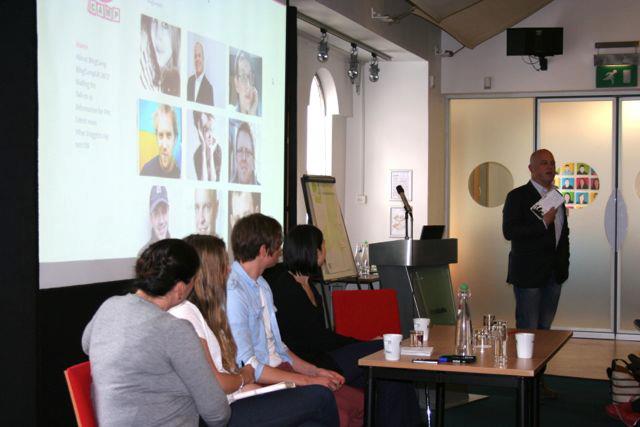


 Search Engine Optimisation (SEO) has often been seen as a bit of a “dark art”. The idea is to improve a site’s result in search engine results (and, let’s be honest, we’re mainly talking about Google).