

Back in the 1980s, I loved reading game development diaries in Zzap!64 (these days I subscribe to Freeze64, which also includes developer diaries) and, so, I’ve decided to try one out myself, albeit for a WordPress plugin rather than an 8-bit video game.
Bazalgette is a plugin that I’ve been trying to complete for a number of years, each time being partially coded and then abandoned, for varying reasons. However, after promising at WordCamp EU in 2023 that it was going to happen, one year later, I thought I really should do something about it.
Now, I’m going to split this diary over a number of posts and each “day” won’t be sequential, but there may be many days (or weeks) between each entry. However, when a post looks pretty long, I’ll publish it before drafting a next part for later publication.
Background
So, what is Bazalgette? Simply put, it cleans up the WP Admin menu, most of which without any kind of intervention (the exception are a few options which require you to switch them on, as they don’t run by default). Depending on the plugin you have installed, you may find them multi-coloured, positioned in the wrong place, full of additional sub-menus that you don’t want and many, quite simply, just in the wrong place. The menu, as a result, is a mess, and difficult to navigate. Bazalgette just sorts it all out.
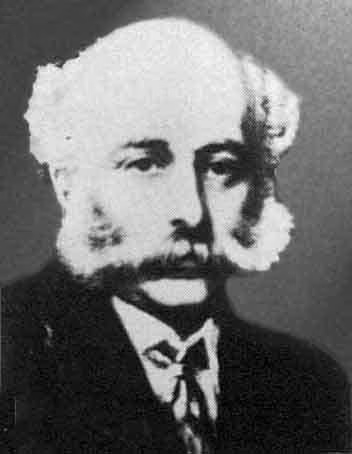
Why the name? Sir Joseph Bazalgette was a 19th century engineer who created London’s first sewer systems. Called into action due to the terrible smell from the polluted River Thames, his actions literally helped to “clean up the crap”. And that’s what this plugin does.
Anyway, as I said, I’d starting writing this plugin a number of times before and, each time, had given up. Why? Well, WP Admin content is held in 2 core globals. Along with the built-in WordPress functions you can read what’s due to be output, as well as add and remove existing menus. Sounds ideal, right? Except, the globals don’t contain the parameter data needed for the functions – instead, it’s the information needed to contruct the menu HTML. So, if I needed to move a menu from one place to another, the global wouldn’t have what I needed to do so using the functions.
I think I wrote one version which just used the globals (and I tried to manipulate the menu content just in that – it didn’t work, as data between menus might be different and I didn’t have the information required to change it) and another which just read from them but used the functions to make changes – it was this latter one where I realised that I simply didn’t have the data I needed. So, in between that last attempt and now, I dug into WordPress core code and realised there was a conversion occurring between the functions and the data stored in the globals – it was all there, just in a different format. If nothing else, this confirmed that the plugin would be possible.
Day 1
So, other than saying I would a year previous, what inspired me to kick-start this project again? Well, actually, it was the realisation that some of the things I wanted to achieve, I could do much easier with AI.
There are 2 components that wouldn’t be possible (well, easily, anyway) without it…
- Moving menus to more suitable locations in the menu bar – AI can look at the plugin page and tell me where it better aligns (for example, if it sits with the media menu).
- If I non-standard icon is used for a plugin (these are often coloured, and cause accessibility issues) – AI can choose a suitable dashicon (again, by looking at the plugin page).
In both cases, I tested this in ChatGPT and proved that it would do it. Before I totally forgot how I do so, I wrote these up in 2 blog posts…
I started prepping for re-writing the plugin. I had a few notes in, well, Notes (the Apple app), many of which I archived, but some I recycled.
I created new notes listing the menu changes I wanted to make, along with one with a proposed code flow.
Here are the changes that I plan for the plugin to make…
- Move the position of the menu if it appears above Posts (AI will do this – if not available, it will be moved to the bottom)
- Remove all styling from menu and sub-menu text, other than a count bubble
- Change any non-standard icons (AI will do this – if not available, a default Dashicon will be used)
- Move settings (or similar) sub-menus to Setting menu (rename as plugin name)
- Move tools (or similar) sub-menus to Tools menu (rename as plugin name)
- Move dashboard (or similar) sub-menus to Dashboard menu (rename as plugin name)
- (Optional) Move documentation (or similar) to a new Documentation menu
- (Optional) Move help (or similar) to a new Help menu
- (Optional) Remove any promotional sub-menus
- (Optional) Remove any blank main menu options (used as separators)
- Remove any menus that, after the above re-arrangements, now have no sub-menus
- Any menus that don’t start off with sub-menus should be moved to Settings
Day 2
I was at WordCamp Whitley Bay and, being surrounded by developers and speaking on the subject of plugins, inspired me to dig fully into the issue that had been eluding me. The thing that has held me up in the past is working out how to take the menu globals and map those to the function parameters. And, today, I cracked it. And it was simpler than I thought it was.
To celebrate, I archived all my old Bazalgette code, took my base plugin template and created a brand new skeleton for it, ready to start writing code. I tested the template on my plugin test site and that all worked 100%.
In my Harness plugin1, I then started writing some initial code for Bazalgette. The code was to read the arrays, looping through the main menu array. If a sub-menu exists, I’ll then loop through that.
I tested it by dumping out the output using print_r and all worked.
Day 3
My plan was to do what I hoped would be the easiest part of this – cleaning the menu titles. I added in a simple stripping of HTML and it… went badly wrong. It removed all the number bubbles, which I’d forgotten about.
Looking at my old Bazalgette code, I did this by looking for a bubble and not doing anything if it had one. That’s not a great solution, so I need to think further about this to come up with the best solution. So I stripped that code back out of Harness for now, but I’ll probably use a Regex to fix this when I get around to it (I’m terrible with Regex, so ChatGPT will be my friend here).
At this point I realised that even the code I wrote the other day was actually wrong. Or, rather lacking. I looped through the main menu array then just dumped out the sub-menu array. I wasn’t looping through it. I added that in, and after finding I was looking at the wrong thing and correcting for that, got it very much 100% this time.
Now my harness code reads through both, skipping menu dividers.
Next, a break from the code for now – I built a new test site, chocked full of terrible plugins!
I installed a lot and then started noting down which of the various issues they demonstrated, allowing me to narrow them down. I started adding a list of them to a spreadsheet too, so I can recreate this at any time.
After much time, I ended up with a list of 25 plugins, which demonstrate most of the problems that I’m looking for. If you’re interested, these are the ones I’m using…
- All in One SEO
- All-In-One Security (AIOS)
- Contact Form Plugin by Fluent Forms
- Elementor
- Envato Elements
- Google Analytics for WordPress by MonsterInsights
- Hostinger Tools
- LiteSpeed Cache
- MalCare WordPress Security Plugin
- MC4WP: Mailchimp for WordPress
- miniOrange SSO using SAML 2.0
- OAuth Single Sign On – SSO (OAuth Client)
- OptinMonster
- Post SMTP
- Royal Elementor Addons and Templates
- Site Kit by Google
- Slider, Gallery, and Carousel by MetaSlider
- Smart Slider 3
- WooCommerce
- Wordfence Security
- WordPress REST API Authentication
- WP Go Maps
- WP Statistics – blank sub-menu item
- WP-Optimize
- WPForms Lite
Based on the pure visual, Wordfence is the worst offender here. If you then include sub-menus that, ideally, should be located elsewhere, then WPForms hits the top spot.
Day 4
In my notes, I’ve now started a list of core changes to suggest to help make the menu situation better for everyone. As I come up with ideas of how to prevent these menu issues in the first place, I’ll add them here before, eventually, adding them into Trac.
I’m continuing the detailing of the test plugins. After speaking to a developer of RankMath (unrelated to all of this), who was being bolshy about how good his code was (and knowing it was on my list of plugins that are… not so good2), I started a new sheet of contact details that I may come across. I now have an email for RankMath. Emailing plugins that cause issues is one of the future enhancements for the plugin, but it’s always worth starting early! Let’s just say that I felt inspired!
I’ve also started creating something like a test plan, which I kinda should have done before the plugin install, where I make a list of all the things I’m looking for.
Finally, I created a Github repo to start sharing the code as I go.
Day 5
I found myself sat at Birmingham Airport with far more time on my hands than I really should have had (I got to the airport way too early). I opened up my laptop and decided to investigate a sub-menu that I’d spotted on the WP Statistics menu – basically, it was adding a space between two sub-menu options, so I wanted to know how it had done it (so I could make sure I get rid of it!).
So, using the code I’d already written, I dumped out the sub-menu options in my test site. Except that sub-menu didn’t appear in the resulting output. Or, indeed, the plugin. At first, I assumed it was the code I’d written to loop through the menus and sub-menus but, it turned out not to be. Instead, I’d got the hook wrong.
I’d intentionally spent some time at the beginning of the project researching the various WordPress hooks to make sure I’d got the right one – one that captures the menu after every other plugin has finished with it, but before it gets output. I concluded it must be admin_menu. That, it seems was wrong. I temporarily reverted it back to what I’d been using in past incarnations of my code – admin_init – and it worked. At some point I need to come back to this to make sure it’s the right one to use, and try and work out why it wasn’t the one I thought it was.
But, it was enough for me to output that blank sub-menu and, yeah, it’s just a sub-menu with a blank title, so there’s nothing to click on but it adds some spacing. Sub-menu spacing isn’t something that core does (it does add menu spacing – that’s going to be a switch-on option for removal, if you want), so I’ll make sure that any such examples are removed.
Day 6
After all this time and my code still doesn’t actually do any tidying. It needed to something. Anything.
So, I added in code to remove any blank lines. It worked. I now perform some cleaning! 🎉
I also took the opportunity to improve the commenting and general structure of what I’ve written so far. I’ve also added in a new routine for cleaning the title, with the mainline structure calling and updating the title with.
And, yes, that’s my next task – cleaning the title. I’ve made use of ChatGPT to help me with the pattern matching. It took me a while to work out the best solution as different plugins use different methods to show it.
Anyway, I find the count between a span statement and save that. I then strip all HTML from the title before then rebuilding the counter on the end – this time using a standardised approach.
Expect I found that the menus were stripped,but not the sub-menus. And, damn, did it take me a while to figure it out. But, basically, I’d got an array element wrong and was updating the wrong part of the array. Anyway, it’s now working beautifully.
I also noticed that the Comments menu has a broken count bubble after it. After a little digging (not as much as the previous issue), I realised this is because it has additional content between the span tags – basically, I assume a number, which I grab and then remove that number. The good thing is, I don’t have to do anything about it – my longer term plan is to identify and ignore any core menus. I may actually implement that next.
Day 7
I added the core menu lookup and this means that the comment menu is now appearing correctly.
However, I appear to have another issues today, unrelated to my plugin – my test site has ground to such a crawl that it’s unusable. After much disabling and enabling of plugins I narrowed it down to WooCommerce. For now I’ve disabled it but it’s odd as it’s not caused any issues until now, and I’ve done nothing different.
Finally, I added a second core menu lookup – previously, this by slug name. However, at some point I want to position menu items based on their alignment to these core menu items. So, a second array, with an index of the name, has been introduced.
One thing that I’ve noticed is that the changes I’ve made so far all have exceptions, in that some are resistant to what I’m attempting to do here – whilst I’ve removed a lot of third party formatting, not all have gone (inc. an annoying animation that OptinMonster adds to its menu). I suspect, rather than putting relevant code inline, they’re hooking it in from an external script. What I probably need to be doing is removing the hooks that they’re using. But thats definitely for another day.
Meanwhile, I’ve implemented some code to identify plugins using non-SVG icons and, in this case, add a default Dashicon. Eventually, I’ll be using AI to choose something more suitable for these, but for now it’s just the Dashicon for a plugin. It works. Except for Wordfence, which doesn’t specify an icon as part of the menu, but a coloured ones appears anyway, which I’m assuming they’re doing – like the menu examples I mentioned above – via hooks. When I fix the menu, it should fix this as well.
As a summary of progress, here’s a before/after example of a section of my test menus…


And here’s a comparison of one of the sub-menus…


In both cases I’ve done my best to align each side with how I’ve cropped them but, as you’ll see, there’s some funky custom spacing going on, which my plugin just rips out.
Day 8
I’ve now done something that needed doing for a while – I’ve removed all customer menu classes, as some were hooking into these to provide custom formats and icons. It works, with one exception.
The Royal Addons menu is still appearing with coloured text, and WPForms has a sub-menu item with a coloured background. I investigated the first – see the details in breakout box below – and fixed the second. Having looked through the code of WPForms it seems it’s adding the “Upgrade to Pro” sub-menu, not using the WordPress functions, but by inserting, after the event, into the $submenu global. The reason, it appears, is because there’s an additional array element which can’t be access via the functions – one that allows you to specify classes to assign sub-menu items. The fix was simple – look for this array element being used and wipe it out. Voila – the sub-menu is now displaying without any customisation.
One additional thing I did was to fix an issue I mentioned a while ago – when to hook into the menus. If you remember, I’d temporarily changed it from admin_head to admin_init as a lot of the menus were missing. I hadn’t understood why, as the admin_head looked to be the correct one to use. I had done some digging in the meantime and found that I was correct – what I was forgetting was the priority of it. I wasn’t specifying one, so any plugins with a higher priority were adding to the global after.
What I found with those plugins was the ideal time to test this theory as it too was hooking into admin_head. I changed my plugin to use it but with a high priority. It worked. So, literally now, I’m reading the globals as soon as they’re populated but before they can be used for the menu output.
Day 9
Today I’ve been concentrating on the code that will allow me to remove certain sub-menus – those that, quite simply, nobody is interested in (usually premium up-sell). I look for certain words in the name and, right now, it works – those sub-menus are gone. So far I’m concentrating on those words that only appear at the very beginning of the menu title, but I need to extend this that appear elsewhere – I may have to use regular expressions, or similar, to make sure I match them correctly.
I also decided now was the time to share this very early version with anybody who wants to provide feedback. So I’ve taken the code out of my test plugin and placed it in the “proper” template for Bazalgette, before uploading it to Github. I then shared, on both Reddit and social media, links to the repo Discussion so that anybody can try it out and feed back.
Apart from the one person who told me they wouldn’t help because it wasn’t “available from WordPress”, and hence couldn’t be guaranteed not to contain Malware – thanks for that – I started to get some valuable feedback trickling in. If you’d like to try the code out and contribute feedback, please go here.
One thing I have decided to do is not to wait until all features are implemented before adding in essential code such as caching and the settings screen.
Meanwhile, a very minor change, but I’m now trimming the title (removing spaces from the beginning and end), as I really can’t trust some developers to not do weird things like that, especially as it may then trip up my code that looks for and removes certain menus, based on their name.
Now, every weekday, I go swimming. This is relevant, please bear with me. I swim half a mile. Not particularly quickly – it takes me about 20 minutes. But during this time, with no distractions, it’s a great time to think. This is when I come up with my best ideas, particularly when it comes to development, and plans for this plugin are, not surprisingly, often on my mind during this time. And, during a recent a swim, I came up with a longer term plan for the removing and moving of menu options. What I’ve done already has not been a waste, as I’ve proven to myself that it works – it’s the implementation that needs re-thinking. Different words that identify a menu type can appear in different places of the name, plus there are different things I want to do with them (move them, delete them, etc.). On top of that, some of these will be adjustable – e.g. some menu types you’ll be able to decide if you want to keep them as-is, delete them or move them.
So, that’s my direction of travel next.
- I have a plugin named Harness that I use for testing out bits of code. I’m trying things out in this first, before transferring the code over to the main plugin, so that I can test each component independently ↩︎
- No, it’s not on my list of plugins being tested – all of the issues demonstrated by RankMath were being reproduced by other plugins, so I removed it from the list, purely for keeping examples to a minimum ↩︎
 Share this post on social media.
Leave a Reply